Build a media library
If you want a poster wall, episode browsing, search, and resume history, set up a media server first and then connect TinyPlay to it. The server organises the content; TinyPlay lets you choose titles on your phone and plays them on the computer connected to the TV.
Beginner installation guides
If you do not have a server yet, choose either Jellyfin or Plex, get one test folder working, then connect TinyPlay:
- Jellyfin: start with the official installation guide and setup-wizard walkthrough.
- Plex: follow Plex's official Quick-Start & Step-by-Step Guide.
What is a poster wall?
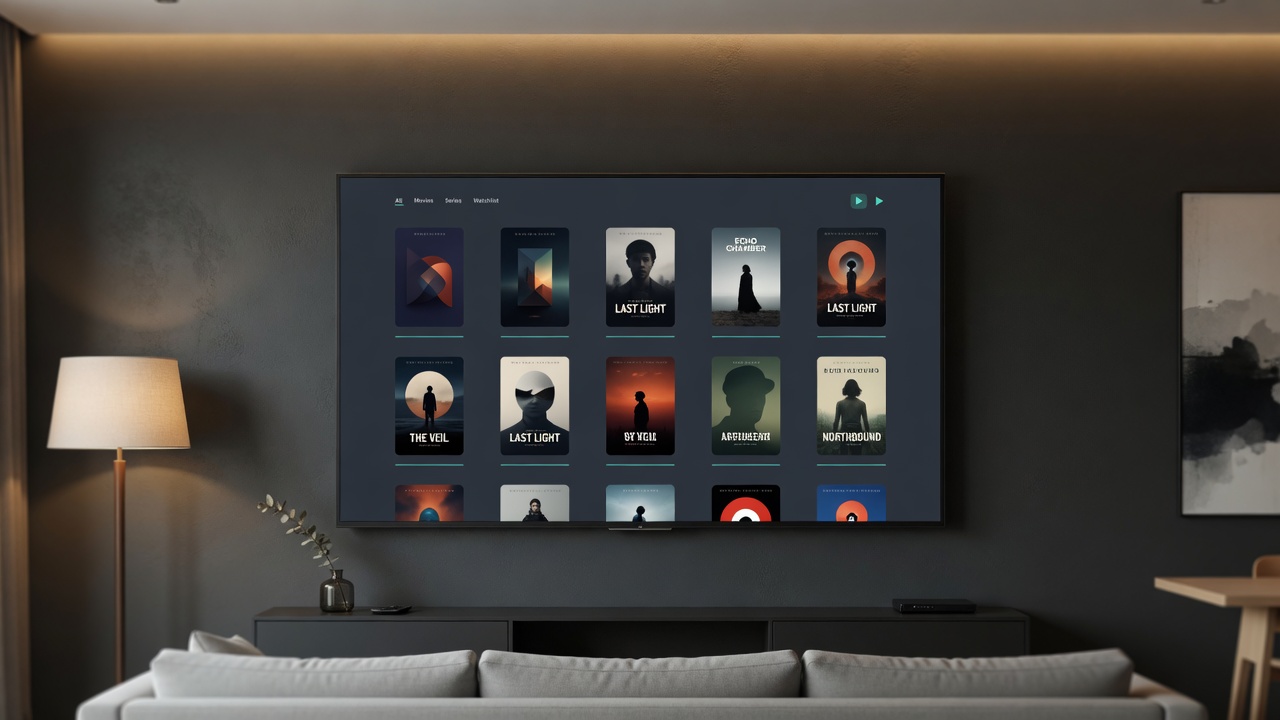
A poster wall is a media library laid out like shelves of covers: each film or series has a poster tile, often with a title, year, or rating underneath. Tap a poster to open details, pick an episode, or continue watching.
It is not required to play files. Browsing folders works too, but you miss unified covers, episode structure, and resume history. A media server scans the folders you organise, matches posters and metadata, and builds that wall. Once TinyPlay connects to the server, you can browse by poster on your phone and play on the computer connected to the TV.
Recommended: Plex
In many English-speaking setups, Plex is a practical starting point: broad device support, a mature app ecosystem, and a Docker image that can be launched with a one-line command. TinyPlay handles playback itself, so a Plex Pass is not required for the features TinyPlay uses. Once the server is running, add it in TinyPlay as a Plex source.
Organise folders first
A media server needs a clear folder structure. Keep movies, TV shows, and animation in separate trees, and nest episodes as Show / Season / file. That makes posters, episode metadata, and subtitles easier to match.
Media/
├── Movies/
│   └── Movie Title (Year).mkv
└── TV Shows/
    └── Show Name/
        └── Season 01/
            └── S01E01.mkv
You do not need a perfect setup on day one
Getting one folder recognised by the media server, connecting TinyPlay, and playing a single title is enough to prove the whole path. Covers, metadata polish, and remote access can wait until you need them.